
Part 4: Providing Affordable SEO for Small Business Using Jev (Part 1)
Published:
This is Part 4 of the Modern Software for Small Businesses and Nonprofits series, and Part 1 of a new sub-topic inside it: providing affordable SEO for small business, starting with local business-listing profiles, and starting with Jev doing the narrow work it’s actually good at.
The short version
SEO tools that can manage more than five or six sites at once can easily cost $1,000 a month. For an agency to make a living reselling that, a small business ends up paying several thousand dollars a month — money that is not affordable for most of them. So I’m building a small, human-assisted tool that creates one approved business record once and prepares it for ten listing sites, as an experiment. It is semi-automated on purpose, because the sites themselves don’t all allow the same thing, and I’d rather be honest about that than ship something that gets a client’s listing suspended.
The problem: SEO pricing locks small business out before it starts
Here’s the plain fact I keep running into: the popular SEO tools that can manage more than five or six client sites can easily cost $1,000 a month. An agency buying that tooling has to recover it across its client base, and the bill that lands on an individual small business is several thousand dollars a month. That’s not a business decision a solo tea shop or a two-truck pet-waste company gets to make — it’s simply out of reach.
Local listing profiles (Google, Bing, Yelp, Nextdoor, and the rest) are one of the cheapest, highest-leverage pieces of local SEO there is, and they’re exactly the kind of repetitive, multi-site data entry a small agency charges for. So the first experiment in this sub-series is narrow: can one approved record be reused across ten listing platforms without an agency retainer, and without quietly breaking any site’s rules to do it?
What Jev is, in plain terms
I don’t expect anyone to already know what Jev is, so here it is simply: Jev is an AI model I reach through TypeSafe’s official SDK (docs.typesafe.ai), and I use it only for narrow, bounded decisions — not for writing code and not for driving a browser.
Jev shows up in exactly one place in the running application: a loopback-only “runtime assist” endpoint. A human supplies compact, visible page state and a closed set of candidate answers; Jev picks among them; the endpoint validates the choice against the candidates it was given and always returns executionAllowed: false. It cannot navigate, fill a field, upload anything, submit anything, or expand what an adapter is allowed to do.
Why semi-automated, not fully automated
Before writing a single adapter, I decided to validate, not assume, what each site’s rules actually say — so here’s what I found, and where I still don’t know.
The common framing is this: some sites simply won’t let a bot click “submit,” and stricter sites won’t let a bot populate the form fields at all. That’s real, but it undersells how granular the actual permission question is. I ended up tracking each platform’s permission on several separate dials — business eligibility, free-profile availability, read/navigate, fill, upload, submit, account/verification requirements, and address visibility — and every one of them defaults to unknown means deny. A Jev answer cannot grant a capability; only documented, official evidence can.
What that produced, platform by platform:
- Foursquare documents that service API keys are explicitly intended for internal automation, scripts, and agents — the only platform of the ten with an affirmative automation grant. (authentication, place search, suggest place)
- Bing Places documents a free claim/add/update flow and lets an eligible service-area business hide its public address, but nothing in the official help establishes permission to automate its web interface. (Bing for Business help)
- Nextdoor documents a free Business Page for local, casual-service, and home-service providers, requiring an owner or authorized representative to claim it. (Create a Business Page)
- Data Axle documents a free route for one to ten listings with duplicate matching and verification. (Local Listings)
- Yelp documents that claiming a page is free but requires owner or representative verification. (Creating a Yelp Page)
- BBB separates a free Business Profile from paid accreditation — the pilot is never allowed to drift into the accreditation funnel. (Get Listed)
- Angi is the one I actually blocked: its signup funnel asks for a mobile number and explicitly authorizes marketing calls and texts, and I could not find a free, no-lead-funnel profile route. Until that changes, it’s blocked outright, not “manual.” (Angi pro join)
- Apple Business, Yellow Pages, and Facebook Pages all have a documented free or claimable path, but none of them establish enough about address visibility, eligibility, or current terms to automate anything beyond preparing values for a human.
So “semi-automated” isn’t a hedge — it’s the honest description of ten sites that each permit something different, with the default on every undocumented permission set to deny.
The architecture
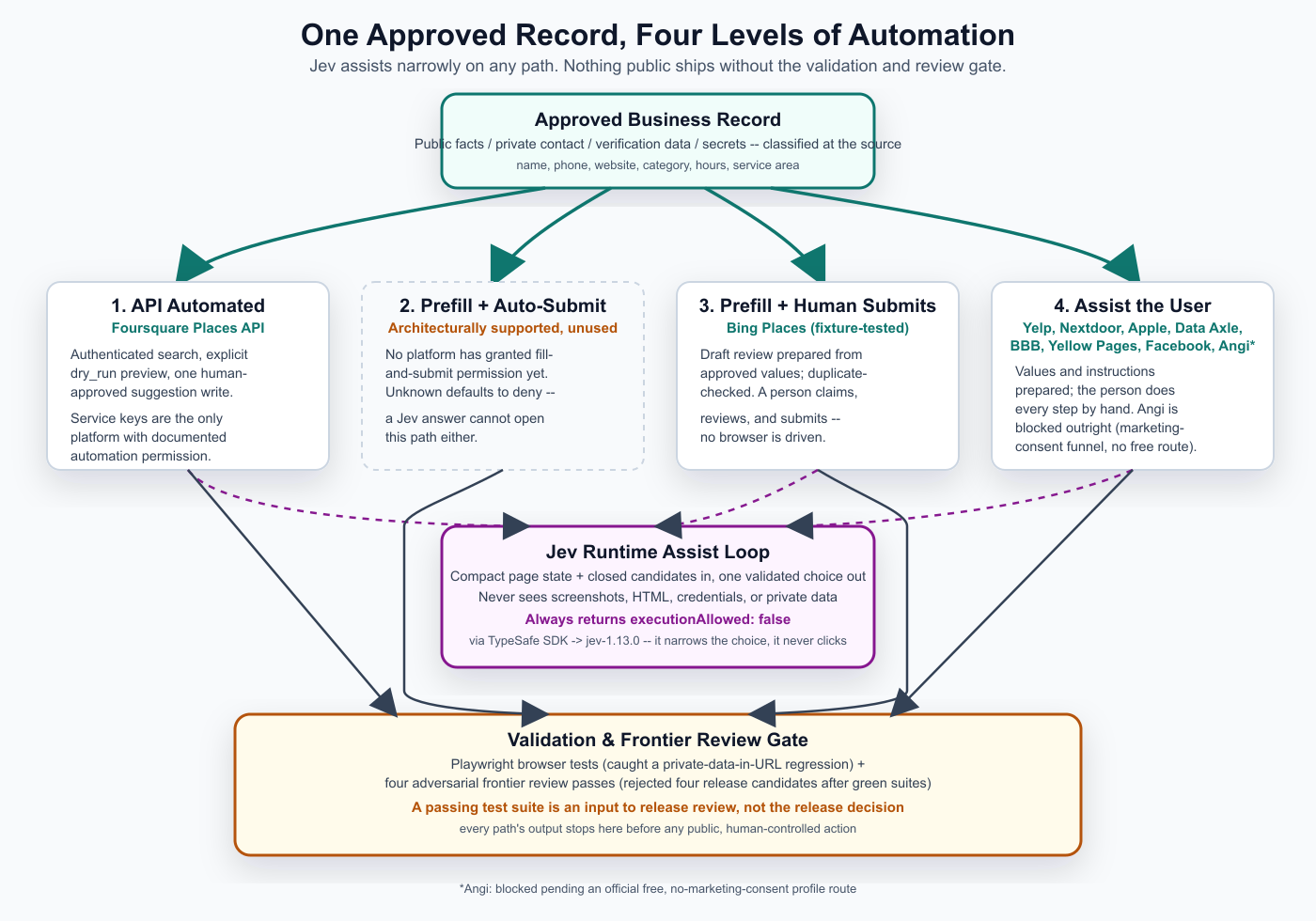
The diagram above is the real shape of the system: one approved, source-attributed business record feeds four possible levels of automation, Jev sits in a narrow assist loop that any of those levels can call into but that can never act on its own, and nothing reaches a live platform without passing a validation gate and a second, adversarial review from a stronger model first.
- API automated — Foursquare. The only platform with a documented automation grant. The adapter does an authenticated duplicate search, an explicit
dry_run=truepreview, and then one human-approveddry_run=falsesuggestion write — never a browser interaction with Foursquare’s business portal. - Prefill + automated submit. Architecturally supported by the adapter contract, but currently unused by every one of the ten platforms, because none of them has granted fill-and-submit permission. This is the level where “unknown means deny” actually bites: Jev being confident about a field does not open this path either.
- Prefill + human submits — Bing. A fixture-tested draft review is prepared from the approved record, checked against known duplicates, and handed to a person to claim, review, and submit. No browser drives Bing’s site.
- Assist the user — the other eight platforms. Values and instructions are prepared; the person does every step themselves, in their own browser, with their own login.
This is also the path with the most unused room for Jev — ideas I want to try, not finished work, and every one of them still ends with the person clicking submit themselves:
- Clipboard assist — the tool notices which field the person has focused (its label and the text around it), Jev picks the matching value from the approved record, and it lands on the clipboard for one paste.
- Label matching per site — Jev maps each platform’s own wording (“Contact number,” “Business phone”) back to the record’s fields, since no two sites use the same labels.
- Category picking from each site’s own taxonomy — the same narrow job Jev already does for Foursquare’s category list, applied to whichever list the next platform uses.
- Page recognition — Jev classifies which step the person is looking at (claim, verification, address options, done) so the tool can show the right instruction instead of a generic one.
- Duplicate judgment — before the person claims anything, Jev looks at a search result and judges whether it’s plausibly the same business.
- Address-visibility choice — Jev reads a site’s own address and service-area options and suggests the setting that matches how the record’s address is classified.
Jev’s runtime assist loop sits underneath all four paths, not inside any one of them: it takes compact page state and a closed candidate list, returns one validated choice, and never sees a screenshot, raw HTML, a credential, or a private email.
Status
The project is still in progress, and it’s a ten-site experiment, not a finished product: one platform (Foursquare) has a real, tested API adapter; one (Bing) has a fixture-tested human-submit workflow; eight are deliberately manual-guidance or, in Angi’s case, blocked. Live dry_run and live writes against the real Foursquare endpoint for the pilot business are still untested, pending the client’s approval of the location and category facts. If it keeps working, I’ll open source it.
Part 2 of this sub-series will pick up once there’s a live, human-approved publication to report on.
Previous: Part 3 — My Ten-Year-Old Built a Video Game From Four-Word Prompts · Series: Modern Software for Small Businesses and Nonprofits