
The End of Software Scarcity, Part 4: Rosa’s Story — Lead Workflow
Published:
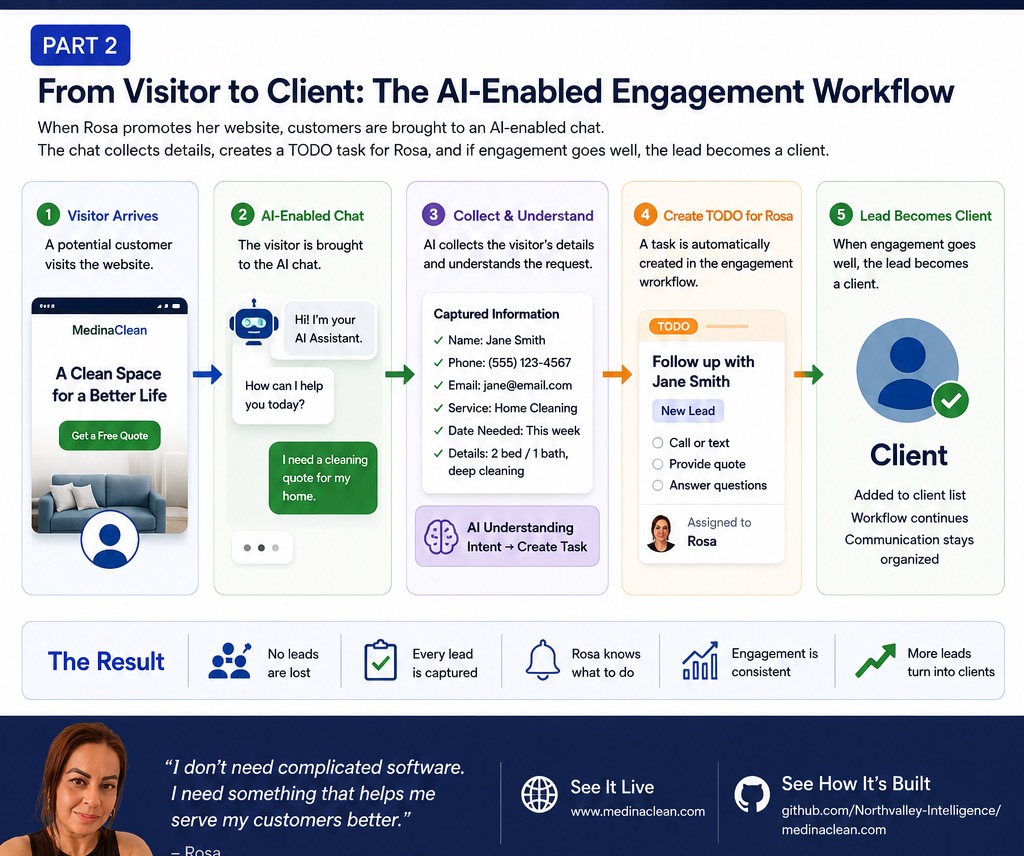
In the previous article, I described the website and AI chat experience built for Rosa’s cleaning business.
The website is the front door. The more interesting part is what happens after someone raises their hand.
From Visitor to Operations
Many small business websites stop at a contact form. A visitor submits information, an email goes somewhere, and someone hopefully remembers to follow up.
For Rosa, the goal was different. The chat and appointment form should feed a lightweight operations system, not just a mailbox.
The admin interface now covers more than a simple lead list:
- Clients: customer memory, phone, email, address, language, preferred contact channel, cleaning frequency, price, notes, and review/referral flags.
- Jobs: scheduled cleanings, status updates, price, service type, notes, crew assignment, and calendar invites.
- Calendar: day, week, and month views for jobs, follow-ups, and blocked or reserved time.
- Crew: crew members, roles, active status, default availability, and upcoming unavailability.
- Tasks: new appointment requests, pending chat leads, pending reviews, upcoming job confirmations, and clients who need the next recurring cleaning planned.
- Follow-ups: reminders to confirm a cleaning, ask for a review, ask for a referral, offer recurring service, or handle a manual task.
- Reviews: pending, approved, and rejected reviews, with approval required before anything appears publicly.
- Videos: YouTube upload, preview, visibility toggles, and cleanup of stale records.
- Ads: a Meta ad planner that validates campaign name, budget, ZIP targeting, and platform choices before touching the Meta API.
That is not a full CRM. It is intentionally smaller.
Rosa does not need territory management, revenue forecasting, or a sales pipeline built for a large team. She needs to know who wants service, who is already a client, what needs to happen next, and what is on the calendar.
The Workflow
The workflow is simple:
- A visitor reaches the website.
- Chat or the appointment form captures the request.
- The admin task list makes the lead visible.
- Rosa can turn the lead into a client record.
- Jobs, follow-ups, crew assignment, and calendar blocks keep the work organized.
- Reviews, videos, and ads feed the next round of trust and customer acquisition.
The important design choice is that the system follows the shape of the business. It does not ask Rosa to become a CRM operator. It gives her a Spanish-first operations screen for the work she already does.
Why This Matters
Historically, custom operations software for a thirteen-client local business would have been hard to justify. The cost of building it would have exceeded the business case.
Coding agents change that calculation. They make it practical to build the small, specific workflows that used to feel too custom, too messy, or too low-value to implement.
The result is not software abundance in the abstract. It is a local cleaning business getting tools that match the way it actually works.
What Comes Next?
Now the question becomes measurable.
Do more visitors become leads? Do more leads become clients? Does Rosa actually use the task list, calendar, reviews, videos, and ad planner?
I do not know yet. But now there is a system in place to find out.
Is the system perfect? Of course not.
There are probably a thousand bugs hiding underneath it. But that is true of software everywhere. Multi-million dollar retail sites still go down on Black Friday. A small local business can live with some rough edges if the software is useful, private, inexpensive, and easy to improve.
That is the reason I believe software is cheaper now. What we built in roughly two weeks would have been hard to imagine from a seven-person team in a quarter before AI coding agents. Not because the app is enterprise-perfect, but because it is specific, usable, and already shaped around Rosa’s actual work.
The repository gives a rough sense of the pace. Excluding package-lock.json, the project has about 16,600 tracked lines across 113 files, including about 3,600 lines of tests. The commit history shows 63 commits over six active coding days. Counting from the first to last commit on each active day gives about 40 visible work hours, or roughly 400 tracked lines per hour across application code, tests, database migrations, docs, and configuration. If we split the history into tighter coding sessions with long breaks removed, the visible commit windows are closer to 12 hours.
Lines of code are an imperfect metric. But the order of magnitude matters. This is the kind of small-business software that used to be economically irrational to build. Now it can be built, tested, revised, and shipped while the business opportunity is still fresh.